


A golf cart controller regulates how much battery current reaches the drive motor every time you press the accelerator pedal.
Your cart lurches forward on takeoff.
Top speed drops off for no clear reason.
A faint hot electronics smell rises from under the seat after a hill.
Owners often replace batteries or a solenoid first and the cart still misbehaves. Trust in the cart for daily trips fades fast.
Controllers fail slowly. Heat, moisture, vibration, and weak battery packs wear down the internal MOSFETs and capacitors long before the cart quits completely, and catching the early signs saves the motor and the solenoid from collateral damage.
Three problems make controller trouble hard to pin down:
- Solenoid faults and weak batteries mimic controller symptoms almost exactly.
- Newer AC drive carts hide fault codes behind brand specific diagnostic tools.
- Ordering the wrong controller for your drive system wastes weeks and shipping.
Carts & Parts diagnoses controllers daily and stocks genuine OEM EZGO replacements for both lead acid and ELiTE lithium carts. The guide below explains what a golf cart controller does, how to confirm it is the failing part, and which OEM unit fits your EZGO.
Key Takeaways
What does a golf cart controller do?
A golf cart controller such as the Curtis 1206HB or EZGO ELiTE 1206 HBC converts steady battery pack voltage into rapid pulses using pulse width modulation (PWM) to set motor speed and torque. Longer pulses mean more current to the drive motor and higher speed. The controller also reads the throttle sensor, forward and reverse switch, and brake inputs before releasing power.
What are the signs of a failing EZGO controller?
A failing EZGO controller shows up as jerky acceleration, random speed surges, a hot heat sink, or a cart that runs one day and crawls the next. Battery range shrinks because a damaged controller wastes energy as heat. Complete no move conditions with a clicking solenoid often point to the controller after the solenoid tests good.
Which OEM controller fits a 48V EZGO TXT or Express?
The OEM EZGO 48-Volt Controller, PN 612632, is a Curtis 1206HB-5201 rated for 250 amps and fits select 48V TXT, Express, Terrain, Shuttle, and Cushman models. Genuine EZGO packaging preserves factory wiring, current limits, and safety logic.
Which controller do ELiTE lithium carts use?
EZGO ELiTE lithium carts use the OEM EZGO ELiTE 1206 HBC Controller, PN 658278, engineered to communicate with the Samsung SDI advanced battery system. The 1206 HBC coordinates torque delivery, regenerative braking, and IntelliBrake signals in one sealed unit.
What Does a Golf Cart Controller Do in an EZGO?
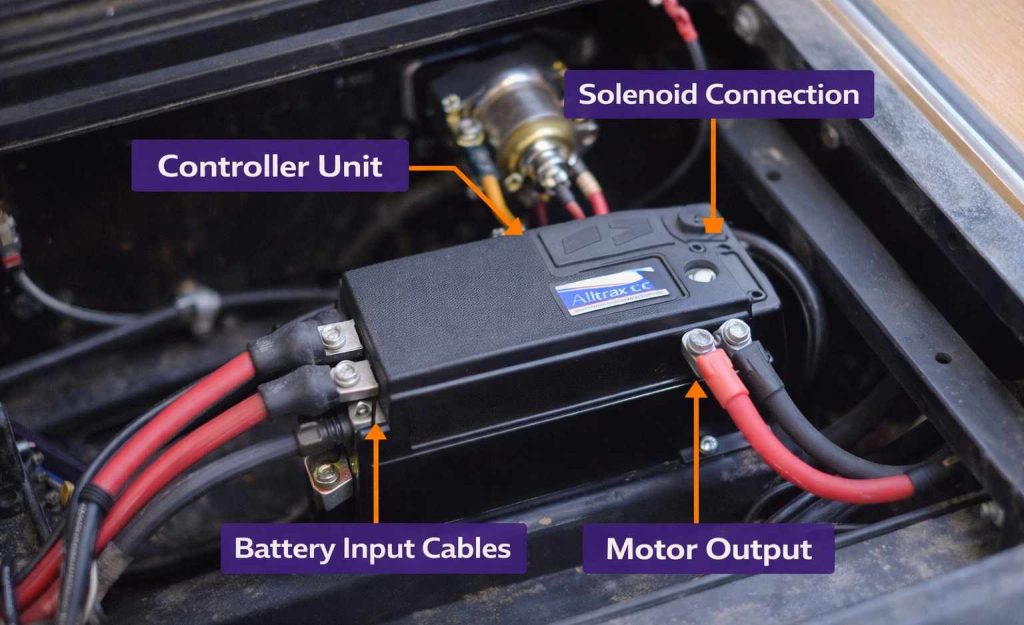
The golf cart controller sits between the battery pack, the solenoid, and the drive motor, and it decides how much current the motor receives at every pedal position. Curtis built units like the 1206HB dominate lead acid EZGO TXT and Express carts, while ELiTE lithium models run the 1206 HBC.
Every controller works the same basic way. Pack voltage arrives at the B+ terminal, the throttle sensor reports pedal position, and the controller switches that voltage on and off thousands of times per second. Wider pulses push more energy to the motor. Our EZGO golf cart parts guide covers where the controller fits among the other electrical parts on your cart.
Modern controllers also act as the safety brain of the cart, blocking power on direction changes at speed, a stuck throttle, or an open brake circuit.

How Does the Controller Work With the Solenoid, Throttle, and F/R Switch?
The solenoid, throttle sensor, and forward and reverse switch feed inputs to the controller, and the controller uses those inputs to decide when the main circuit closes. Pressing the pedal energizes the solenoid coil, the solenoid contacts close, and pack voltage arrives at the controller. Only then does the controller begin metering current to the motor.
The throttle sensor changes by model. Older TXT carts use an ITS (inductive throttle sensor), while other systems use a potentiometer or micro switch. Corroded pins or a drifting sensor produce erratic readings that feel exactly like controller failure. Our EZGO controls and switches guide breaks down each input component by model year.
What Is the Difference Between a Series Controller and a PDS or AC Controller?
Series controllers, such as the Curtis 1206HB, drive a series wound DC motor and provide simple, rugged speed control.
PDS (Precision Drive System) and DCS controllers add regenerative braking and speed limiting to a separately excited DC motor. AC controllers on the EZGO RXV and newer Freedom models drive a three phase AC motor and require software level diagnostics.
Knowing which system your cart runs is the first step in choosing a replacement. A series controller will not operate a PDS motor, and neither will it run an AC drive.
The motor side of that match is covered in the EZGO electric motor replacement guide, which lists the OEM 36V PDS, 48V DC, and 48V AC motors by platform so the controller and motor you order belong to the same system.
All three share the same high current layout. The Curtis Instruments controller manual notes that the B+, B-, and M- busbars carry full motor current and that the internal boards are ESD sensitive, so a replacement should be handled by the case and bolted down before cables are attached.
How Do You Know Your Golf Cart Controller Is the Problem?
Controller failure on an EZGO TXT, Express, or RXV follows recognizable patterns, and each symptom points to a different cause inside the unit.
Symptom: The cart jerks or surges at steady pedal pressure.
Cause: Failing output MOSFETs deliver uneven pulses.
What it means: Internal damage is under way and will get worse with heat.
Symptom: The heat sink is too hot to touch after light use.
Cause: Excess resistance or a shorted stage is dumping energy as heat.
What it means: Stop driving before the motor or wiring gets damaged.
Symptom: The solenoid clicks, batteries read full, but the cart does not move.
Cause: The controller is not passing current from B+ to the motor.
What it means: Confirm the solenoid contacts and then suspect the controller.
Customers with a confirmed speed controller failure appreciate having options beyond a full price replacement. John Shekell worked with Cole on a 36V EZGO and shared how the exchange program helped:
"Very helpful and interested in helping me solve my ez go 36 volt problem. The exchange program for a bad speed controller was a big dollar saver!! Shipped on time and worked as Cole said it would. Always good to work with a company that lives up!!"
Reviews like his are part of the more than 2,000 online reviews customers have posted about the Carts & Parts team.
| Symptom | Likely Cause | What to Check First | OEM Part |
|---|---|---|---|
| Cart jerks or surges at steady pedal pressure | Failing output MOSFETs delivering uneven pulses | Throttle sensor signal, then controller output | 612632 (48V TXT, Express) or 658278 (ELiTE) |
| Heat sink too hot to touch after light use | Shorted stage or excess resistance dumping energy as heat | Cable ends and terminals for heat marks | Replace controller after cables check out |
| Solenoid clicks, batteries full, cart does not move | Controller not passing current from B+ to M- | Solenoid continuity, then B- to M- output | 612632 or 658278 by drive system |
| Reduced range with a healthy pack | Controller wasting energy as heat | Load test, then heat sink temperature | Controller by drive system |
| Limp mode or fault codes on RXV or ELiTE | Speed sensor, BMS throttle, or controller fault | Speed sensor and BMS before the controller | Diagnostic tool read, then 658278 if confirmed |
Source: Carts & Parts service experience and OEM E-Z-GO product data. Confirm the drive system by serial number before ordering.
What Is the Fastest Way to Diagnose a Controller Fault?
A structured four step check separates a bad golf cart controller from a weak battery pack or worn solenoid in under an hour.
- Load test the battery pack and inspect every cable end for corrosion or heat marks.
- Listen for the solenoid click and test continuity across its main terminals.
- Measure controller output between B- and M- while an assistant presses the pedal.
- Pull fault codes with the correct diagnostic tool on RXV and other AC drive carts.
Follow the order. Skipping ahead wastes money on a part that may not be bad.
How Do You Test a Golf Cart Controller With a Multimeter?
Controller testing on a 36V or 48V DC EZGO needs a digital multimeter, insulated gloves, safety glasses, and a helper to press the pedal.
Step 1: Disconnect and inspect. Remove the negative pack cable first, wait 30 seconds for capacitors to discharge, and look for melted insulation or green corrosion at every terminal. Worn battery cables create voltage drop that looks like a weak controller, so replace any that show heat damage.
Step 2: Check pack voltage at rest and under load. A healthy 48V lead acid pack reads roughly 50 to 52 volts fully charged. Watch the reading while your helper presses the pedal. A large sag under load means the batteries, not the controller, are the weak link.
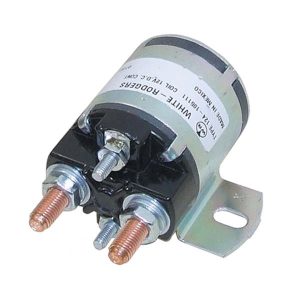
Step 3: Confirm the solenoid. Reconnect the pack, turn the key on, and press the pedal. A firm click plus near zero resistance across the large terminals means the solenoid is passing power. No click or high resistance means the fault is upstream, and our EZGO golf cart solenoid guide walks through the fix.
Step 4: Read throttle input. Probe the throttle signal wire while the pedal moves from rest to full travel. Voltage should climb smoothly. Jumps or dead spots point to the sensor or its connector.
🚨 Warning: Golf cart battery packs can deliver several hundred amps into a short circuit. Remove rings and watches, keep tools insulated, and follow the OSHA electrical safety guidance for personal protective equipment before touching any live terminal.
Step 5: Measure controller output. With the pack connected, set the meter to DC volts and read between the B- and M- terminals as the pedal moves. Output should rise in step with pedal travel. Full input voltage with no rising output confirms a failed controller.
Step 6: Test drive. Reconnect everything and drive on level ground. Smooth, linear power confirms the repair. Bucking or dead spots mean more testing.
What Controller Do ELiTE Lithium EZGO Carts Use?
EZGO ELiTE lithium carts run the OEM EZGO ELiTE 1206 HBC Controller, PN 658278, a sealed unit engineered to communicate with the Samsung SDI advanced battery system rather than a lead acid pack.
The 1206 HBC does more than meter current. The unit manages torque delivery, regenerative braking, and the IntelliBrake hold and release sequence on Freedom RXV and ELiTE Lithium models. A fault inside the controller can look like a brake problem, a battery problem, or a limp mode event.
Multimeter tests tell you very little about a 1206 HBC. Fault codes live in memory that only the EZGO handheld diagnostic tool can read. Persistent codes after a reset, loss of acceleration response, or unexplained motor brake engagement all point back to the controller.
Before ordering, rule out the two parts that most often trigger limp mode on these carts. A dirty or failing EZGO speed sensor on the motor causes the controller to limit speed as a protective measure, and a lithium BMS will throttle output due to a temperature or cell balance fault.
💡 Tip: Have your cart serial number ready before calling. ELiTE controllers changed alongside battery pack revisions, and the serial confirms which harness and firmware level your cart uses.
The correct part for a confirmed 1206 HBC failure is the OEM EZGO ELiTE 1206 HBC Controller PN 658278, shipped nationwide from an authorized EZGO dealer.
Sourcing the right module for a newer EZGO can be frustrating elsewhere. Lee Haag searched everywhere for a control module before our team tracked it down:
"Great service, great communication, I searched all over for a control module that nobody had an answer for and these folks researched it and determine the right part and delivered it on time. I'm very grateful to them."
What Does an EZGO Controller Cost to Replace and When Should You Choose OEM?
An EZGO controller replacement cost depends on the drive system, and the biggest variable is not the part price but the price of getting the wrong part.
Situation: Owners see aftermarket controllers advertised at higher amp ratings than the stock Curtis 1206HB.
Insight: A higher current limit sends more amps through the same solenoid, cables, and motor the factory sized for 250 amps.
Recommendation: Match OEM ratings unless you are upgrading the whole driveline together.
Situation: The cart is an ELiTE lithium model.
Insight: No aftermarket controller replicates the data handshake between the 1206 HBC and the Samsung SDI pack.
Recommendation: Use the OEM 658278 only.
Situation: A 36V TXT owner needs a controller on a budget.
Insight: Exchange programs let you send in the failed core.
Recommendation: Ask about core exchange availability when you call.
✅ Good to Know: Carts & Parts lists every OEM part with transparent pricing and no hidden fees on the product page, and orders over $50.00 ship free.
What Is Controller Testing on Newer AC Drive Carts?
Controller testing on the EZGO RXV, Club Car IQ and Precedent, and Yamaha Drive2 requires brand specific diagnostic tools because the AC controllers store fault codes and settings in software.
The EZGO handheld diagnostic tool reads codes, monitors motor and battery status, and programs RXV controllers. Club Car IQDM and the Yamaha Diagnostic Tool serve the same role on their brands. A basic multimeter still verifies pack voltage, cable condition, and solenoid function, but it cannot see inside the AC drive.
Our service department in Union City runs full RXV diagnostics and can often confirm a controller fault the same day.
Can a Speed Controller Upgrade Make Your Golf Cart Faster?
A speed controller upgrade raises the current limit sent to the motor, and on a series wound EZGO TXT that translates into stronger hill climbing and quicker takeoff.
Top speed comes from motor RPM and pack voltage more than from the controller. A higher amp controller helps most on heavy carts, lifted carts with big tires, and steep terrain. Our guide on 8 ways to make your golf cart faster ranks the upgrades in order of impact.
⚠️ Important: A 400 or 500 amp controller demands a heavy duty solenoid, thicker battery cables, and often a motor rated for the extra current. Upgrading the controller alone overheats stock components.
What Happens If You Ignore a Failing Golf Cart Controller?
Ignoring a failing golf cart controller rarely ends with the controller alone. Cascading damage spreads to the motor, solenoid, and battery pack.
- Uneven current pulses overheat motor windings and shorten motor life.
- A shorted controller stage welds solenoid contacts and can strand the cart with power locked on.
- Wasted energy drains the pack faster and accelerates battery wear.
- Sudden surges create a safety hazard for passengers and anyone nearby.
Early diagnosis keeps the repair to one part instead of three.
What Does a Healthy Golf Cart Controller Feel Like?
A healthy golf cart controller delivers smooth, predictable power on every trip, loaded with groceries or climbing a steep driveway.
- Acceleration follows pedal travel with no surge or hesitation.
- Range between charges returns to normal because energy goes to the motor, not to heat.
- The heat sink stays warm to the touch, never hot, after routine use.
- Direction changes and braking behave exactly as the factory intended.
Owners tell us the difference is immediate. Toby Spencer brought his cart in for an electrical issue and described the result:
"I recently had my golf cart into Carts and Parts for an electrical issue! Jeff , Cole and Staff were amazing to work with and did an exceptional job fixing my cart!! I can't say enough how much of a pleasure it was working with them!! I HIGHLY recommend them for any and all your golf cart needs!… GREAT JOB!"
Get Professional Golf Cart Controller Help From Carts & Parts
Carts & Parts is an authorized EZGO dealer in Union City, Indiana, backed by more than 2,000 online reviews and free shipping on orders over $50.00. Our technicians diagnose controllers on TXT, Express, RXV, and ELiTE lithium carts and stock the OEM parts to fix them.
Have your serial number ready and call (937) 459-8891. Cade, Cole, and Peyton will confirm the right controller before you order.
Frequently Asked Questions About Golf Cart Controllers
What does a golf cart controller do?
A golf cart controller regulates current from the battery pack to the drive motor using pulse width modulation. Units like the Curtis 1206HB read throttle position, direction, and brake inputs, then release power in measured pulses. We stock OEM controllers for every EZGO drive system.
What are the symptoms of a bad EZGO controller?
Common symptoms include jerky acceleration, random speed changes, a very hot heat sink, reduced range, and a solenoid that clicks while the cart stays put. You may also see fault codes on RXV and ELiTE models. We recommend testing batteries and the solenoid before replacing the controller.
How do you test a golf cart controller with a multimeter?
Disconnect the negative cable, inspect all terminals, then reconnect and measure DC volts between the B- and M- terminals while a helper presses the pedal. Output should rise with pedal travel. Full input voltage with no output means the controller failed. We can walk you through readings by phone.
Should you check the solenoid before replacing the controller?
Yes. A worn solenoid produces the same no move symptom as a dead controller. Listen for a firm click and measure resistance across the main terminals. Replace the solenoid first if it fails, then retest the controller. We stock OEM solenoids for every EZGO model.
Which controller fits a 48V EZGO TXT or Express?
A 48V EZGO TXT or Express with a series DC motor uses the OEM EZGO 48-Volt Controller, PN 612632, a Curtis 1206HB-5201 rated for 250 amps. We confirm the drive system from your serial number before shipping, since PDS and AC carts take different units.
What controller do EZGO ELiTE lithium carts use?
ELiTE lithium carts use the OEM EZGO ELiTE 1206 HBC Controller, PN 658278, which communicates with the Samsung SDI battery system and coordinates IntelliBrake. Aftermarket units cannot replicate that data link. We ship the genuine part nationwide.
Is it safe to keep driving with a failing controller?
Driving on a failing controller risks motor and solenoid damage and can cause sudden surges. Stop using the cart if you smell hot electronics or feel unpredictable acceleration. We can diagnose the fault before it spreads to other parts.
Are golf cart controllers interchangeable between brands?
No. EZGO, Club Car, and Yamaha controllers use different wiring, throttle signals, and programming. Even within EZGO, series, PDS, and AC controllers are not interchangeable. We match the controller to your exact drive system.
Does a bigger controller make a cart faster?
A higher amp controller improves torque and hill climbing more than top speed. Speed depends mainly on motor RPM and pack voltage. Larger controllers also require heavy duty solenoids and cables. We help you plan matched upgrades.
How long does a golf cart controller last?
An OEM controller often lasts many years when batteries stay balanced and connections stay clean. Weak packs, corrosion, and moisture shorten controller life significantly. We recommend annual cable and terminal inspections to protect it.
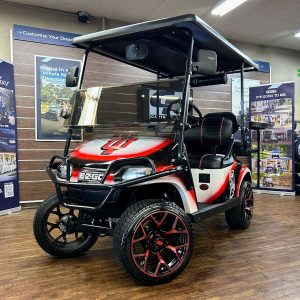
my ego s/n 1360217 after charging goes good and it died right off it does not stopp just slows right down.I have checked batteries and they all over 6 Volts causing me to think controller is causing the problem .
Hi Bill,
Based on your symptoms, your E-Z-GO golf cart may be experiencing issues with its speed controller. However, before concluding that the controller is the problem, you should check a few things:
1. Battery Connections: Ensure all connections are clean, tight, and corrosion-free. Loose or corroded connections can cause power loss.
2. Battery Health: While your batteries show over 6 volts each, this doesn’t necessarily mean they’re healthy. A battery can show proper voltage but cannot still deliver sufficient current under load.
3. Solenoid: Test the solenoid to ensure it’s functioning correctly. A faulty solenoid can cause symptoms similar to a bad controller.
4. Voltage Under Load: Check the voltage of your battery pack while the cart is running. A significant voltage drop under load could indicate weak batteries.
5. Error Codes: If your cart has a diagnostic system, check for any error codes that might point to the source of the problem
If you’ve ruled out these potential issues and the problem persists, the speed controller may be faulty. Common symptoms of a failing controller include inconsistent speed, loss of power, and the cart slowing down unexpectedly. Let us know if we can help you in any way.
what Curtis controller do I need for a lithium 51.2 volt 100 ah rated battery in my 2001 club car ds conversion.
Hi Jim! For your 2001 Club Car DS with a 51.2V lithium battery, you’ll want one of these Curtis controllers:
Best Options:
>Curtis 1266A-5201 (36-48V, 275A) – Most popular choice
>Curtis 1268 – Good alternative with more adjustability
Both work great with 51.2V lithium systems (51.2V is the lithium equivalent of 48V).
Before ordering, we need to verify:
>Your motor type (likely SepEx for a 2001 DS)
>Whether you need a conversion harness
Call us at (937) 459-8891 with your serial number and we’ll get you the exact parts you need!
I converted my 2007 DS Club Car 48 volt to Lithium- car ran well for 5 minutes then burnt the resistor wire on the solenoid and stopped running. The motor casing and controller were hot. What should I check to get the cart operational?
Dear Dave, We’re sorry to hear about the issues with your lithium conversion. The burnt resistor wire and overheating you’re experiencing points to a few potential problems:
1. Immediate checks:
Controller compatibility – Verify your controller is rated for lithium batteries. Stock controllers may not handle the higher sustained voltage of lithium packs (lithium maintains higher voltage throughout discharge compared to lead-acid).
Voltage settings – Check if your lithium pack’s fully charged voltage exceeds the controller’s maximum input rating. A 48V lithium pack can reach 54.6V or higher when fully charged.
Pre-charge resistor – The burnt resistor wire suggests the inrush current was too high. You may need to upgrade to a lithium-compatible solenoid with appropriate pre-charge circuitry.
Before restarting:
1. Let all components cool completely
2. Check for any melted wires or damaged connections
3. Test the controller per our guide to ensure it hasn’t been damaged
4. Verify proper gauge wiring for the increased current flow
For lithium conversions, we strongly recommend installing a programmable controller designed for lithium batteries. These controllers have proper voltage cutoffs and current limiting features that protect your system. Contact us at (937) 459-8891 for more details.
Stay safe and disconnect the batteries while troubleshooting!
I have a 2010 EZ-GO 36V electric cart. It has new Duracell batteries holding 37V after sitting 2 days from full charge. It runs perfectly up to 12 mph, no hesitation, no noise, flat ground. It seems it is getting 1/2 the voltage it has because it should be running about 24mph, I believe. This happened after sitting for about two years (It was running perfectly when parked). I replaced all 6 batteries and this is the result. I suspected the speed sensor, replaced it with no change in behavior. What would your recommended procedure of testing be, and what would be your suspicion of fault? What leads would I remove to test the voltage to the motor and would that be a consideration, or would it more likely be the controller?
Thank you for sharing your experience with your 2010 E-Z-GO 36V golf cart. It sounds like you’re dealing with some frustrating issues after it sat unused for two years. Let’s break down some possible causes and steps you can take to diagnose the problem.
Potential Issues
* Controller: This is often a key component that can degrade over time, especially after inactivity.
* Motor: While less common, the motor itself could also be a factor.
* Wiring Connections: Check for any loose or corroded connections.
* MCOR (Motor Controller Output Regulator): A faulty MCOR can limit power to the motor.
Recommended Steps
* Battery Check: Ensure each battery is balanced and functioning properly.
* Controller Inspection: Look for any visible damage or loose connections.
* Motor Voltage Test: Measure the voltage at the motor terminals while pressing the accelerator; it should be close to full battery voltage.
* Solenoid Functionality: Listen for a click when turning on the key to ensure it’s working.
* Wiring Inspection: Examine all wiring for signs of wear or corrosion.
Given your symptoms, it seems the controller may be the main issue, but following these steps should help you narrow it down. If you’re unsure or need further assistance, consulting a professional technician could provide a quicker resolution.
Best of luck, and hope your cart is back to full speed soon!
I have a 2004 48V club car. Turn the key on…nothing, no solenoid clicking, no movement. I replaced batteries, switch, and solenoid. Any help would be great,Thanks
Hello Rodney,
Sounds like you’re dealing with a frustrating situation with your Club Car. When your golf cart is completely unresponsive, it’s time to play detective. Here are some key areas to investigate:
Battery Check
> Verify all battery connections are tight and clean
> Ensure each battery is holding a proper charge (around 8.49V per 8V battery)
> Check for any visible corrosion or damage to battery terminals
Electrical System Diagnostics
> Test the key switch for proper functionality
> Inspect the solenoid – listen for that crucial clicking sound
> Examine all wiring connections for potential breaks or loose connections
Potential Culprits to Investigate
> Solenoid Issues: Even though you’ve replaced it, double-check the installation and connections
> Controller Problems: The MCOR (Motor Controller Output Regulator) might be failing
> Wiring Gremlins: Sometimes, hidden electrical issues can cause complete system shutdown
If you’re not comfortable with electrical diagnostics, don’t hesitate to consult a professional golf cart technician. Also, feel free to give us a call to see if we can help you further.
Good luck. We hope you get your golf cart back on the road soon!
I have a 2007 Yamaha ydre electric golf cart. When I start to go, the cart jerks hard then it seems like I have to push the pedal further down to accelerate. After this initial action the cart seems fine until I stop and start – it does it again.
Hi there Harry,
Based on your description, this sounds like a potential issue with either the speed controller or the solenoid.
Here’s what’s likely happening:
The jerking motion when starting followed by needing more pedal pressure suggests the speed controller may not be providing smooth power delivery during initial acceleration. This could be due to:
* Worn or dirty speed controller contacts
* A failing solenoid that’s not engaging smoothly
* Corroded battery connections affecting initial power delivery
Try:
* Checking and cleaning all battery connections
* Inspecting the solenoid for any signs of wear or damage
* Having the speed controller tested by a qualified technician
Since the cart runs fine after the initial jerk, this suggests the issue is specifically related to the initial power delivery rather than a more serious motor or battery problem.
Let us know if this helps. You can also call us at (937) 459-8891 for more questions.
We use president at race track. After using for part of the day the light on dash comes on. Sometimes it will make cart buck. Batteries test good even when light comes on. 50.2 volts and separate around 8.3 volts. Checked all connections. Any idea would help
Hi Wade,
It sounds like your golf cart is experiencing an intermittent issue that may be related to the electrical system or onboard computer.
Here are some potential causes and troubleshooting steps based on your description:
Possible Causes:
1. Voltage Drop Under Load: Even though your batteries test at 50.2 volts (total) and 8.3 volts (individual), a sudden voltage drop under load could trigger the warning light and cause the cart to “buck.” This might not show up in static voltage tests.
2. Loose or Corroded Connections: While you mentioned checking connections, ensure all terminals are clean, tight, and free of corrosion, including those at the motor and controller.
3. Sensor or Controller Issue: A faulty sensor or issue with the controller could cause erratic behavior, such as triggering the light or affecting performance.
4. Onboard Computer (OBC) Problem: The OBC may be misinterpreting data or detecting an incomplete charge cycle, which could explain the warning light.
Troubleshooting Steps:
1. Load Test the Batteries: Perform a load test on your batteries while driving to see if the voltage drops significantly under load. Even if they test fine at rest, they may not sustain power under stress.
2. Inspect All Connections Again: Double-check all battery cables, motor connections, and controller wiring for any loose or damaged components. Pay special attention to grounding wires.
3. Check for Fault Codes: If your cart has a diagnostic mode or fault code system, check for any stored error codes that could provide more insight into the issue.
4. Monitor Voltage During Use: Install a real-time voltage monitor to observe how the battery pack behaves while driving. This can help identify if voltage sag is causing the warning light to activate.
5. Reset the OBC: Try resetting the onboard computer by disconnecting the negative battery cable for a few minutes and then reconnecting it. This can sometimes resolve erratic behavior.
6. Inspect the Controller: If none of the above resolves the issue, consider having the controller tested by a professional to rule out internal faults.
If these steps do not resolve the problem, consulting a golf cart technician may be necessary to diagnose more complex issues with the motor, controller, or sensors.
We wish you the best of luck in getting your golf cart issue resolved quickly!
Frustrated:
Purchased used 2015 Precedent (in good condition) in 2023. Ran great for ~1yr, then started having jerking/controller issues. Replaced controller sensor (accelerator sensor) 1st time, ran good for a month. Acted up. Replaced again, same: ran good for a month. Replaced again!, same: ran good for a month. Now acting up again! Any ideas? Batteries < 3yrs old, good condition (water, SpGrav., voltages, all good). Wiring appears good.
Controller is MCOR4, (p/n 105116301). Could there be a bad batch of controllers? 1st 3 purchased from Amazon, last one from local golf cart dealer. Any help/feedback appreciated. Thank you…
It’s understanding that you would be frustrated with the recurring controller issues on your 2015 Precedent. Having to replace the accelerator sensor multiple times only to have the same problem return is definitely concerning.
Based on your description, here are some potential causes to investigate:
1. Wiring harness issues: While you mention the wiring appears good, intermittent connection problems can be difficult to spot visually. Check for any pinched, corroded, or loose connections between the MCOR4 sensor and the main controller.
2. Voltage spikes: The controller might be getting damaged by voltage spikes. Consider installing a surge protector or filter capacitor to protect the sensitive electronics.
3. Environmental factors: Check if the sensor is exposed to excessive moisture, heat, or vibration that could be causing premature failure.
4. Main controller problems: The issue might not be with the accelerator sensor itself but with the main controller board that’s damaging the sensors. Having the main controller tested or replaced might resolve the recurring problem.
5. Grounding issues: Poor grounding can cause erratic behavior in electronic components. Ensure all ground connections are clean and secure.
6. Battery terminal corrosion: Even with good specific gravity readings, corrosion at the terminals can cause voltage fluctuations that affect the controller.
Since you’ve already tried multiple replacement sensors from different sources (both Amazon and a local dealer), it seems unlikely that you’ve just been unlucky with multiple bad sensors. The problem is more likely elsewhere in the system.
We recommend having a professional golf cart technician perform a comprehensive diagnostic of the entire electrical system rather than continuing to replace the same component. They can test the main controller and check for intermittent wiring issues that might be causing these repeated failures.
We hope you find the issue quickly. Let us know what you find out.
I have a 2015 Ez-go RXV golf cart the problem I am having is on a full charge I take i out I go maybe a mile and I lose the power to a crawl I have. Replaced The solenoid, new batteries, new battery cables, rewired from the front to the motor still having the same problem what do you think it is
Hi Paul,
It sounds like you’re dealing with a frustrating power loss issue with your 2015 E-Z-GO RXV golf cart. Based on the symptoms you’ve described, here are some likely causes to consider:
1. Motor controller issues – Since you’ve already replaced many components but the problem persists, the motor controller could be the culprit. The controller might be going into a reduced power mode due to overheating or detecting a fault.
2. Speed sensor malfunction – The RXV uses a speed sensor that, when faulty, can cause the cart to enter “limp mode” where it drastically reduces speed as a safety feature.
3. Throttle position sensor issues – A malfunctioning throttle sensor can cause intermittent power loss.
4. High resistance connection – Despite replacing cables, there could still be a high-resistance connection somewhere in the system causing voltage drop under load.
5. Brake switch problems – The RXV has a brake switch that, if not properly adjusted or faulty, can partially engage the brake while driving.
To diagnose further:
– Check if any error codes are being displayed on the dashboard
– Test the controller with a multimeter to ensure proper voltage output under load
– Verify the throttle position sensor is working correctly
– Inspect the brake switch adjustment
Given that you’ve already replaced major components like batteries, cables, and the solenoid, we recommend having the motor controller tested or replaced next, as this is a common source of the symptoms you’re describing.
Please let us know if we can help you further and Good Luck!
I have a 2007 YDRE 48V, stopped dead on me while on course. Batteries all load test fine and 53V when in tow position. Switch to run, solenoid clicks, voltage on system drops to less than 1V. Fuse good, all wiring appears good with continuity check. Did try replacing solenoid but same result. Completed 12V motor check and had motor rotation.
Hi CJ,
Thank you for reaching out about your 2007 YDRE 48V golf cart issue.
Based on your description, you’re experiencing a classic short circuit scenario. When your solenoid clicks and the voltage drops dramatically (from 53V to less than 1V), this indicates current is flowing somewhere it shouldn’t.
Since you’ve already checked the batteries, solenoid, fuse, and performed continuity tests, the most likely culprit is your controller. When a golf cart controller fails, it often creates a direct short across the power circuit, causing exactly the symptoms you’re describing.
Next steps we recommend:
1. Test the controller input/output terminals for shorts using a multimeter
2. Check for any burnt components or corrosion on the controller board
3. If possible, bypass the controller temporarily to confirm it’s the source of the problem
Many controller failures on Yamaha Drive models from this era result from water intrusion or component failure over time. Since your motor passes the 12V test, this further suggests the controller is the issue rather than the motor itself.
Feel free to ask if you need guidance on safely testing or replacing the controller!
Thank you for the reply, the controller was my suspicion since I can find no sign of short circuit in the wiring harness. It is a Moric, also with no sign of corrosion or burnt components externally or internally. There is an internal capacitor that I thought might be a problem.
How do I safely bypass the controller to confirm it is the issue?
thanks again
Hi again, CJ,
You’re on the right track by suspecting the controller, especially after ruling out wiring shorts, corrosion, and burnt components. However, bypassing a golf cart controller-especially a Moric controller like yours-is not straightforward or recommended for most users, as it’s deeply integrated with the cart’s safety and throttle systems. There isn’t a simple “jumper wire” trick to safely bypass the controller using the existing wiring harness, and doing so could risk damaging your motor or other components.
Here’s what you can do instead:
Process of Elimination: The safest and most common way to confirm a controller failure is by testing all other components (batteries, solenoid, wiring, motor) and, if they all pass, concluding the controller is at fault.
Direct Motor Test: Since you’ve already done the 12V motor spin test and the motor runs, this further points to the controller as the likely issue.
Bypass for Testing (Not Operation): Some advanced users temporarily bypass the controller by wiring the battery pack directly to the motor for a brief, low-speed test, but this is risky and not recommended unless you are experienced, as it bypasses all safety features and can damage the motor if done incorrectly. If you attempt this, always jack up the rear wheels for safety, and use extreme caution.
With the existing harness and wiring, you cannot simply bypass the controller. You could send direct current to the motor etc. but not using existing throttle set up and wiring.
Recommendation:
If all other components check out and you still have the symptoms described (solenoid clicks, voltage drops to near zero), your controller is almost certainly the culprit. Replacing the controller is the safest and most reliable next step. If you want to be absolutely sure, you could consult a golf cart technician or use a known-good controller for a swap test.
Let us know if you need further guidance. Good luck and remember Safety First!
It was the controller, updated to Alltrax and back on the course…thanks for all the help with this.
Ahh, that’s great news! So happy you are back on the course. Please let us know if there is anything else we can help you with!
Have fun this summer!
What controller and what amp do you suggest for ezgo txt 6 seater that has been upgraded to Nidec GLO-4001 and DC House 38.4 Lithium battery? And what Solenoid? recommended?
Hi Susan,
For your EZGO TXT 6-seater with that Nidec GLO-4001 motor and DC House 38.4V lithium setup, here’s what we recommend:
Controller: Go with the Navitas TSX 3.0 600-amp controller. Since you’ve got a 6-seater with that nice Nidec motor, you’ll want the extra power for hauling passengers and tackling hills. The 600-amp will give you excellent torque and speed – you’re looking at 25+ mph capability. Plus, the Navitas has Bluetooth connectivity so you can fine-tune your settings right from your phone.
Solenoid: You’ll definitely need a heavy-duty solenoid with that 600-amp controller. We suggest either the Curtis/Albright SW180-93 or the MZJ400A (make sure to get the 36V version with resistor and diode). Both can handle the high amperage. Don’t try to run that controller with your stock solenoid – it’ll fry!
Important notes:
> Make sure your DC House battery can handle 600-amp discharge rates (most of their lithium packs can, but double-check)
> You’ll need 4-gauge or larger battery cables
> The Navitas controller comes with a plug-and-play harness that makes installation pretty straightforward
This setup will transform your cart. Expect to see significantly better acceleration, hill climbing ability, and overall performance. The lithium battery paired with the 600-amp controller is a killer combo.
Contact us for help sourcing these parts at (937) 459-8891, and if you have any more questions.
I have a 2011 Club Car Precedent that has recently started to run at reduces speed. It does not always do this, but on occasion. I always keep the cart at full charge. It also has lithium battery. Could this be the controller beginning to fail?
Hi Carl,
Intermittent reduced speed on a Club Car Precedent with lithium batteries is actually a pretty specific scenario worth unpacking.
The short answer: yes, the controller could be involved, but with lithium batteries, the more likely culprit is the battery management system (BMS) triggering a temporary power reduction.
Lithium packs have built-in BMS protection that can throttle output when it detects a cell imbalance, temperature issue, or a voltage anomaly even if the pack reads “full.” This often shows up as exactly what you’re describing: intermittent reduced speed that clears itself.
A few things worth checking before pointing the finger at the controller:
1. BMS faults — Does your lithium pack have a companion app or indicator lights? Many brands (Ionic, Dakota, Allied, etc.) log fault codes that can confirm whether the BMS is throttling output.
2. Battery connections — Lithium packs are sensitive to loose or corroded terminals. Even a minor resistance issue can trigger a BMS response under load.
3. Speed sensor — On the Precedent, a failing inductive speed sensor on the motor can cause the controller to limit speed intermittently. This is a common and relatively inexpensive fix.
4. Controller diagnostics — If the above check out, the controller is worth testing. Our blog post covers the testing steps in detail, and a Curtis handheld programmer (if your cart uses a Curtis controller) can pull fault codes directly.
If you’d like to walk through it more specifically, give us a call at (937) 459-8891. We’re an authorized EZGO dealer, but we’re happy to point you in the right direction on Club Car diagnostics as well.
Hope that helps narrow it down!
Thank you for your reply.
1. BMS faults — Does your lithium pack have a companion app or indicator lights? Many brands (Ionic, Dakota, Allied, etc.) log fault codes that can confirm whether the BMS is throttling output. I don’t have a BMS app to check the battery.
2. Battery connections — Lithium packs are sensitive to loose or corroded terminals. Even a minor resistance issue can trigger a BMS response under load. Check all of the battery terminals (3 batteries). All are clean and secure.
3. Speed sensor — On the Precedent, a failing inductive speed sensor on the motor can cause the controller to limit speed intermittently. This is a common and relatively inexpensive fix. Do you have advice on how to test and replace if necessary the Speed Sensor
Hi again, Carl!
Good news on the connections which rules out one of the more common culprits. Since the BMS app isn’t an option, we’ll move on and the speed sensor is a logical next step.
On the Precedent, the inductive speed sensor sits near the rear of the motor and reads a tone ring on the motor shaft. When it starts to fail, it sends inconsistent signals to the controller, which responds by limiting speed as a protective measure, which lines up with what you’re describing.
To test it, you’ll want a multimeter set to AC voltage. With the cart on jack stands and the rear wheels off the ground, have someone slowly rotate a rear wheel by hand while you probe the sensor’s signal wire (typically the center wire of a 3-wire connector) against ground. A working sensor should generate a small AC voltage as the tone ring passes. If you get nothing or a very erratic reading, the sensor is likely the problem.
Replacement is straightforward. The sensor unplugs from the wiring harness and is held in place by a single bolt or bracket near the motor. You’ll want to match the part to your specific Precedent. The sensor changed slightly across model years, so having your serial number handy helps confirm the right one.
If you’d like help sourcing the correct part or want to talk through the diagnosis, give us a call at (937) 459-8891 and we can point you in the right direction.