EZGO golf carts feature several key controls and switches for operation and safety, including a key switch, direction selector (F/R switch), and a Run/Tow switch.
Contents
ToggleYou may find yourself troubleshooting when you turn the key, press the pedal, and nothing happens.
Or your cart lurches forward when it should go backward.
Few things frustrate a golf cart owner more than an electrical ghost in the machine. Your EZGO relies on a complex network of switches and controllers to translate your foot pressure into smooth motion. When one link in that chain fails, your cart becomes a stationary lawn ornament.
Electrical issues often manifest in three distinct ways:
- Intermittent starting: The cart runs fine one minute but refuses to move the next.
- Stuck in gear: The direction selector feels loose or fails to engage the correct direction.
- No power: The solenoid clicks, but the wheels refuse to turn.
Professional diagnosis identifies the actual failed component rather than guessing based on symptoms.
In this guide, we cover EZGO control systems from basic switch types through advanced drive system diagnostics and model-specific compatibility requirements.
EZGO Controls & Switches: Key Takeaways
- Safety First: The Run/Tow switch protects your expensive controller during maintenance or towing.
- System Identification: Knowing if you have a PDS or DCS drive system determines which parts you need.
- Simple Fixes: Many “major” failures are actually just worn micro-switches in the pedal box or F/R assembly.
How EZGO Golf Cart Controls & Switches Work
Your golf cart is an ecosystem of electrical components.
The battery pack provides the raw power, but the control system acts as the brain and nervous system. It decides how much power flows to the motor and in which direction.
At the heart of this system sits the speed controller.
Newer models use solid-state controllers to manage amperage flow. Older systems might rely on resistor coils.
Regardless of age, the controller takes orders from various switches. The ignition switch wakes the system up.
The Speed Controller: How It Manages Power on EZGO Carts
The controller manages the flow of electricity. It prevents the cart from snapping your neck with instant torque when you touch the pedal. It ramps up voltage smoothly.
In regenerative braking models like the RXV, it also manages the energy returned to the batteries as you slow down. The Integrated Starter/Generator Controller handles this process on newer gas models.
Safety Switches on EZGO Golf Carts and Why They Matter
Switches do more than turn things on. They act as safety gates.
The reed switch in the charging receptacle prevents the cart from driving away while plugged in. The micro-switch in the pedal box ensures the solenoid only engages when you actually want to move.
For a complete breakdown of how these components fit into the larger vehicle architecture, review our Complete EZGO Parts Guide.
Diagnosing Common EZGO Control & Switch Problems
Diagnosis requires patience and a multimeter. You cannot fix electrical issues by guessing.
We see many customers replace expensive motors when the real culprit was a corroded wire on the F/R switch.
Lou Baumann found himself in a similar situation needing a specific part quickly:
“I needed a new I.S.G for my easy golf cart, and I needed it the next day, they have the greatest customer service, they got me the part, the correct part was no problems, and I had it. The next day. I would recommend and I will be back.”
We aim for that level of accuracy with every diagnosis.
Symptom: The solenoid clicks, but the cart does not move.
Cause: This often indicates a high-amperage failure. The solenoid contacts may be burned internally, or the controller output is dead.
What it means: You have control voltage (the click) but no flow to the motor.
Symptom: The cart moves but shudders or drives slowly.
Cause: A failing throttle sensor (ITS) or a bad connection on the F/R switch can cause resistance.
What it means: The controller is receiving “noisy” or partial signals.
3 Steps to Test EZGO Controls & Switches with a Multimeter
Follow this logical progression to isolate the fault.
- Check the Pack Voltage
Connect your multimeter to the main positive and negative battery terminals. You must have the required voltage (36V or 48V). A dead pack cannot activate the solenoid or controller.
- Inspect Mechanical Connections
Wiggle the wires on the F/R switch and the motor. Loose terminals create heat and resistance. Look for melted insulation or green corrosion on the copper connectors.
- Test for Continuity
Set your meter to the continuity setting (the beep). Test the key switch and micro-switches. They should complete the circuit when activated. If the meter remains silent, the switch is internally toast.
How the EZGO Speed Controller and Solenoid Work Together
The relationship between the controller and solenoid defines your cart’s performance.
- The solenoid is the gatekeeper. It is a heavy-duty relay that connects the battery bank to the controller.
- The controller is the manager. It decides how much of that power goes to the motor.
How to Tell If Your EZGO Controller Is Bad
Controllers rarely die quietly. They often smell like burning electronics or show visible melting on the terminal posts.
However, they can also fail silently. If your solenoid clicks and your motor tests fine (by jumping it directly), the controller is the likely suspect.
Solenoid Click Testing on EZGO Golf Carts
The “click” is the sound of the internal plunger connecting the high-amperage contacts.
- No Click: Check the small activation wires from the pedal/key switch.
- Click but No Power: The internal contacts are likely carbonized or burned.
Directional Switches & Key Systems on EZGO TXT & RXV
The ability to reverse is what makes a golf cart versatile. EZGO uses two main methods to achieve this.
- Older “Series” carts use a manual lever located by your knee. This mechanical switch physically moves heavy copper plates to reverse the current flow.
- Newer “Sepex” (PDS/DCS) carts use a small rocker switch on the dash.
EZGO Forward/Reverse Switch Types (Lever vs Rocker)
The manual lever style is prone to heat damage. High amperage flows through these contacts.
Over time, the copper melts into the plastic board, causing a poor connection. If your F/R handle feels hot to the touch, you need to replace it immediately.
EZGO Key Switch Issues, Differences & Replacement Tips
Not all keys are universal. The TXT key is different from the RXV key.
We also see many issues where the key switch terminals rust on the back of the dashboard, causing intermittent power loss. Our Battery & Electrical article covers cleaning and maintenance procedures.
Voltage Regulators on Gas EZGO Carts: Location & Function
Gas EZGO carts do not use speed controllers in the same way, but they rely heavily on a voltage regulator.
The voltage regulator manages the output from the starter/generator. It ensures the battery stays charged without being cooked by over-voltage.
Signs Your Gas EZGO Voltage Regulator Is Going Bad
A failed regulator usually results in one of two extremes:
- Under-charging: The battery slowly dies, and the cart stops running.
- Over-charging: The battery boils over, smelling like sulfur or rotten eggs.
EZGO Forward/Reverse Switch Locations (TXT, RXV & Series)
The location depends entirely on the drive system of your specific cart. This is often the first clue in identifying what replacement parts you need.
Manual Lever Assembly:
On older Series carts and some gas models, the switch is a large mechanical lever located on the body of the cart, just below the driver’s right knee. It requires physical force to throw the lever from Forward to Reverse. This connects directly to a heavy-duty switch assembly behind the plastic cover.
Electric Rocker Switch:
On modern PDS (Precision Drive System), DCS (Drive Control System), and RXV models, the switch is a small electric toggle or rocker button. It is typically located on the dashboard next to the key switch.
This switch does not handle high power. It simply sends a low-voltage signal to the controller, which then electronically switches the motor direction.
How to Identify Your EZGO Model for Switch & Controller Compatibility
You must confirm your specific model to buy the right switches. Parts vary significantly between gas and electric models, and even between different electric drive systems.
- Check the Serial Number
Look for the manufacturer’s tag in the passenger glove box compartment or on the chassis rail under the driver’s seat. Use this serial number to verify the year.
- Identify the Drive System
- Series System: Has a manual F/R lever by the knee. The motor does not have a speed sensor on the end.
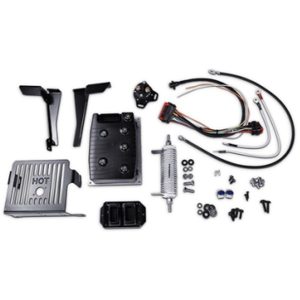
- PDS (Precision Drive System): Has a dashboard F/R switch and a Run/Tow switch under the seat. The controller is usually black.
- DCS (Drive Control System): Has a dashboard F/R switch and a Run/Tow switch. The controller is usually open or unprotected.
Always consult the EZGO owner’s manual for the wiring diagram that matches your year and model.
PDS vs DCS EZGO Drive Systems: Key Differences for Controls & Switches
Understanding these two systems is critical for ordering controllers and solenoids, as they are not interchangeable.
DCS (Drive Control System):
Introduced in the mid-90s, this was EZGO’s first attempt at a “Sepex” (Separately Excited) system. It allows for regenerative braking and electronic speed control.
It features a Run/Tow switch on the controller cover. However, DCS controllers were sensitive to voltage drops and are prone to failure if the battery pack is weak.
PDS (Precision Drive System):
This succeeded the DCS in the early 2000s. PDS is more robust and offers “performance chips” or personality plugs that change the speed and braking characteristics of the cart.
You can identify a PDS cart by the F/R switch on the dash and the presence of a Run/Tow switch in the battery compartment.
The 48V Battery Charger remains compatible across both system types, though charging protocols differ slightly.
What Happens If You Ignore EZGO Control & Switch Problems
Ignoring a sticky switch or a clicking solenoid rarely ends well.
- Stranded Riders: Electrical parts usually fail completely rather than gradually. You will end up walking home.
- Fire Hazard: Loose connections create immense heat from resistance. This can melt wiring harnesses or even cause a fire.
- Expensive Collateral Damage: A bad voltage regulator can boil your $800 battery pack dry.
- Safety Risks: A failing F/R switch can cause unexpected directional changes that endanger passengers.
Enjoying a Reliable EZGO Golf Cart Ride Again
A well-maintained control system means a cart that starts every time you touch the pedal. It means smooth acceleration and reliable braking.
When you fix the root cause rather than just the symptom, you regain confidence in your vehicle.
Andrew Lupien experienced this relief after struggling with a complex issue:
“Stellar Customer Service!! Everyone I spoke to at Carts & Parts knew exactly what they were doing. They gave me great advice to rectify my EZGO EX1 ISG issue. They delivered the correct part within 72 hours via UPS. The price for the part with free delivery was less than 1/4 of the price others reportedly have paid from all my research.”
Get Professional Help with EZGO Control Systems & Switches
Carts & Parts stocks the parts you need and the technical knowledge to use them correctly.
You might need a $15 micro-switch. You might need a $400 controller replacement. Our team knows the difference between a fried PDS controller and a corroded reed switch that costs $8 to fix.
We specialize in diagnosing these exact frustrations.
With more than 1,500 five-star reviews, our customers trust us for accurate diagnosis and permanent repairs. We help you identify the failure point so you can get back to driving.
For related engine and fuel system components, visit our EZGO Golf Cart Gas Motor & Engine Parts guide.
Call us today: (937) 459-8891
EZGO Controls & Switches FAQs
1. How do I know if my EZGO golf cart controller is bad?
If your solenoid clicks but the cart doesn’t move, and you have confirmed the motor is good, the controller is the likely failure. Also, look for a burnt smell or melted terminals. Controllers can also fail silently without visible damage.
2. Where is the forward/reverse switch on an EZGO TXT or RXV?
On Series TXT models, it is a lever below the seat behind the driver’s leg. On PDS/DCS TXT models, it is a rocker switch on the dashboard next to the key switch.
3. Can I safely bypass the solenoid on an EZGO golf cart to test it?
Yes. With the rear wheels jacked up safely, you can use a heavy jumper cable to bridge the two large posts. If the motor spins when you press the pedal, the solenoid contacts are bad and need replacement.
4. What does the voltage regulator do on a gas EZGO golf cart?
It regulates the output from the starter/generator to roughly 14.5V to 15.5V. This keeps the battery charged without overcharging it. Failed regulators either undercharge or boil the battery dry.
5. Why does my EZGO golf cart click but not move?
This is the classic “Solenoid Click” symptom. It means the activation circuit works, but high power is not getting to the motor. The solenoid contacts are burned or the controller output is dead.
6. How much does it cost to replace an EZGO controller?
Standard remanufactured controllers range from $200 to $500. Upgraded high-amperage controllers for lifted carts can range from $500 to $900. OEM controllers provide the most reliable performance.
7. Do I need a heavy-duty solenoid for my lifted or upgraded EZGO cart?
Yes. If you upgrade to a high-amp controller or larger tires, the stock solenoid cannot handle the increased current. It will fuse shut or burn out under the higher load.
8. Can I install a new EZGO key switch myself?
Absolutely. It is usually a simple two-wire or four-wire connection. Access the back of the dash, remove the retaining nut, and swap the wires one by one to ensure correct placement.
Hello,I have a 36 volt ezgo golfcart and I have no power to the solenoid or ignition switch, if I run power to the solenoid I am able to drive the cart.Theres no power coming out of the yellow wire on the computer but the 2 red next to it are live 40 volts,I’m thinking it’s the computer .
Any suggestions?
Hi George, thanks for the detailed description which helps narrow things down quite a bit.
On a 36V EZGO, the yellow wire you’re referencing on the controller is typically the key switch output line. When that wire goes dead while the two red (positive) wires are showing voltage, it usually points to one of three things:
1. The key switch itself has failed,
2. There’s a broken or corroded connection between the key switch and the controller
3. The controller has lost its key switch output function.
Before replacing the controller, we’d suggest testing the key switch directly with a multimeter. Check for continuity through the switch when it’s in the ON position. If the switch is passing voltage through and the yellow wire is still dead at the controller, that’s a stronger indicator the controller is the culprit.
That said, to give you more specific guidance we’d love to know the year and model of your cart. If you can find the serial number (on EZGO it’s typically on a plate under the passenger-side glove box area or on the driver-side frame), that’ll tell us exactly what you’re working with.
Feel free to give us a call at (937) 459-8891 and we can walk through it with you. We’re an authorized EZGO dealer and this is exactly the kind of thing we help with every day.